



Introduction
Ever found yourself manually exporting Power BI reports, saving files, and emailing them out repeatedly? Power BI scheduled export is the answer to automating this routine, enabling you to set up report exports on a fixed schedule without lifting a finger.
Power BI scheduled export is a feature that allows users to automate the extraction and distribution of reports from Power BI on predefined timelines. This can include exporting reports as PDFs, PPTs, Excel files, or even sharing dashboards directly via email. Monitoring key business metrics becomes simpler and less time-consuming, allowing teams to focus on insights rather than logistics.
Why does this matter? First, it saves significant time. Teams no longer need to export and distribute reports manually every day or week. Second, it minimizes errors and delays in sharing crucial information, supporting timely decision-making. Third, automated exports can be standardized for consistent reporting formats and brand compliance.
In this article, we’ll walk through three main options to set up Power BI scheduled export:
- Native Power BI tools with data-driven subscriptions,
- Microsoft Power Automate integrations, and
- Rollstack — a powerful presentation automation platform that streamlines exports to slide decks and other formats.
By the end, you’ll have a clear understanding of each method’s benefits and drawbacks and which best suits your team’s needs.
Option 1: Power BI Native Scheduled Export
How It Works
Power BI offers built-in functionality to schedule report exports primarily through “data-driven subscriptions.” This feature automates report delivery by triggering exports based on data conditions or fixed schedules. Typically, users define a subscription, select the report/pages to export, choose export format (PDF or PPT), and specify email recipients.
The feature is accessible via Power BI Service on the Power BI Pro or Premium licensing plans and supports exporting paginated reports and dashboards. Users configure schedules for daily, weekly, or monthly exports and attach the output directly to automatic email notifications.
Pros & Cons
Pros:
- Native integration ensures seamless access without external tools.
- Supports exporting multiple formats (PDF, PPT).
- Easy sharing via email with customized recipient lists.
- Full control within the Power BI environment.
Cons:
- Limited to certain report types and export formats.
- Scheduling flexibility can be restrictive, especially for complex workflows.
- Email recipients must have Power BI licenses for some export types.
- Lacks customization of exported report layouts beyond what the report author designed.
Option 2: Microsoft Power Automate for Scheduled Export
How It Works
Microsoft Power Automate is a cloud-based service that enables workflow automation between apps and services. You can build flows to export Power BI reports on a schedule, convert them into desired formats, and deliver via email, SharePoint, Teams, or other channels.
Users create a “recurrence” trigger to set the export frequency, then add Power BI “Export to File” actions. This can target specific reports or dashboards. After the export, additional steps can distribute the file, rename it dynamically, or archive the outputs automatically.
Pros & Cons
Pros:
- Highly customizable workflows combining Power BI with other services.
- Supports many output destinations beyond email (Teams, SharePoint, OneDrive).
- Automate post-export tasks like file naming, archiving, or conditional notifications.
- Suitable for complex, multi-step processes.
Cons:
- Requires some technical knowledge to build and maintain flows.
- Dependent on Power Platform licensing tiers, possibly increasing costs.
- Export formats primarily PDF; other formats may require workarounds.
- Flow runs and exports can sometimes face latency or API limits.
Option 3: Rollstack for Power BI Scheduled Export and Presentation Automation
How It Works (Step-by-Step)
Rollstack is a presentation automation platform that connects BI tools like Power BI directly to slide templates, automating report generation and distribution on a set schedule.
Here’s how it works with Power BI scheduled exports:
1. Connect Power BI Data Sources: Rollstack securely links to your Power BI datasets or reports. It can pull live data to keep reports up to date.
2. Design Slide Templates: Using existing PowerPoint templates, customize layouts to dynamically receive Power BI visuals, charts, and tables.
3. Automate Export Scheduling: Set export schedules within Rollstack, such as daily or quarterly. The system refreshes data, updates slides, and exports the final PowerPoint or PDFs.
4. Distribute Automatically: Rollstack sends the generated presentations directly via email or uploads them to shared drives or collaboration tools.
5. Create Scaled Content using Templates. Generate multiple versions of reports tailored to different stakeholders, clients, or regions using template-driven automation.
6. Maintain Governance: Keep templates controlled with centralized management, ensuring brand compliance and consistent messaging.
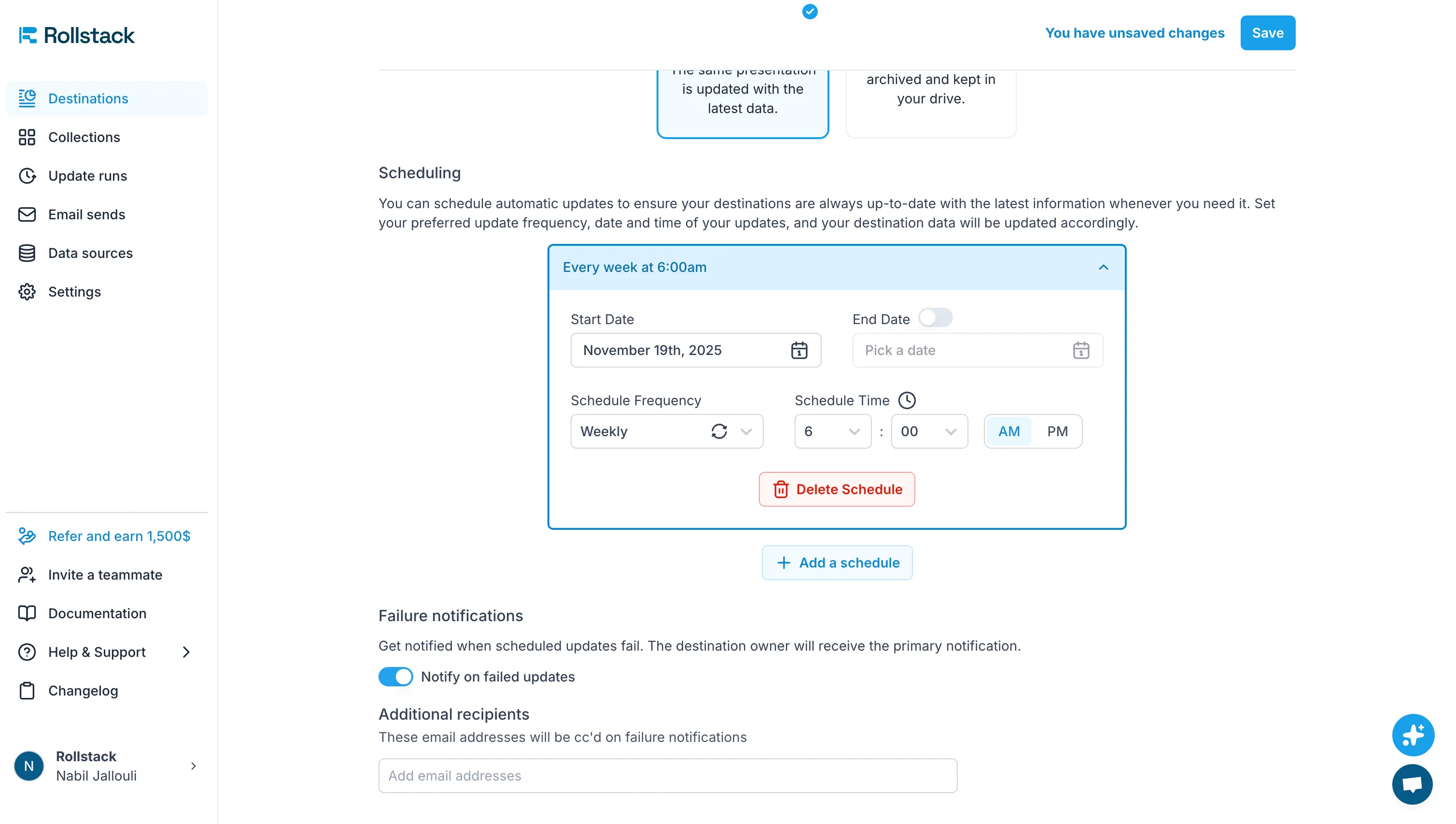
Best Use Cases
Rollstack is ideal for teams needing polished presentations regularly, such as customer success quarterly business reviews, sales deck updates, or client reporting, where Power BI data feeds continually populate slides without manual effort.
Example: A business operations team used Rollstack to replace their 8-hour manual deck update process with automated exports, cutting time down to under 45 minutes weekly, significantly improving their meeting prep productivity.
Pros & Cons
Pros:
- Deep integration with Power BI plus presentation template automation.
- Exports dynamic slides, not just static reports, offering flexible storytelling.
- Supports multiple export formats (PowerPoint, PDF) with branded templates.
- Automated distribution with governance controls.
- Less technical skill needed after initial setup.
Cons:
- Additional subscription cost beyond native Power BI tools.
- Initial setup can require design and integration effort.
- May be too feature-rich for simple export needs.
Comparison: Which Option is Best?
Decision Framework
Choosing between these options depends on your team’s needs:
- If you want a quick, no-extra-cost method inside Power BI for standard report export and email sharing, Option 1 suffices.
- For workflow-heavy teams that use multiple Microsoft services and want to automate file handling post-export, Option 2 (Power Automate) adds flexibility.
- If you need frequently updated presentations with rich visuals and consistent branding, plus automatic distribution beyond email, Rollstack (Option 3) is the best choice.
Comparison Table
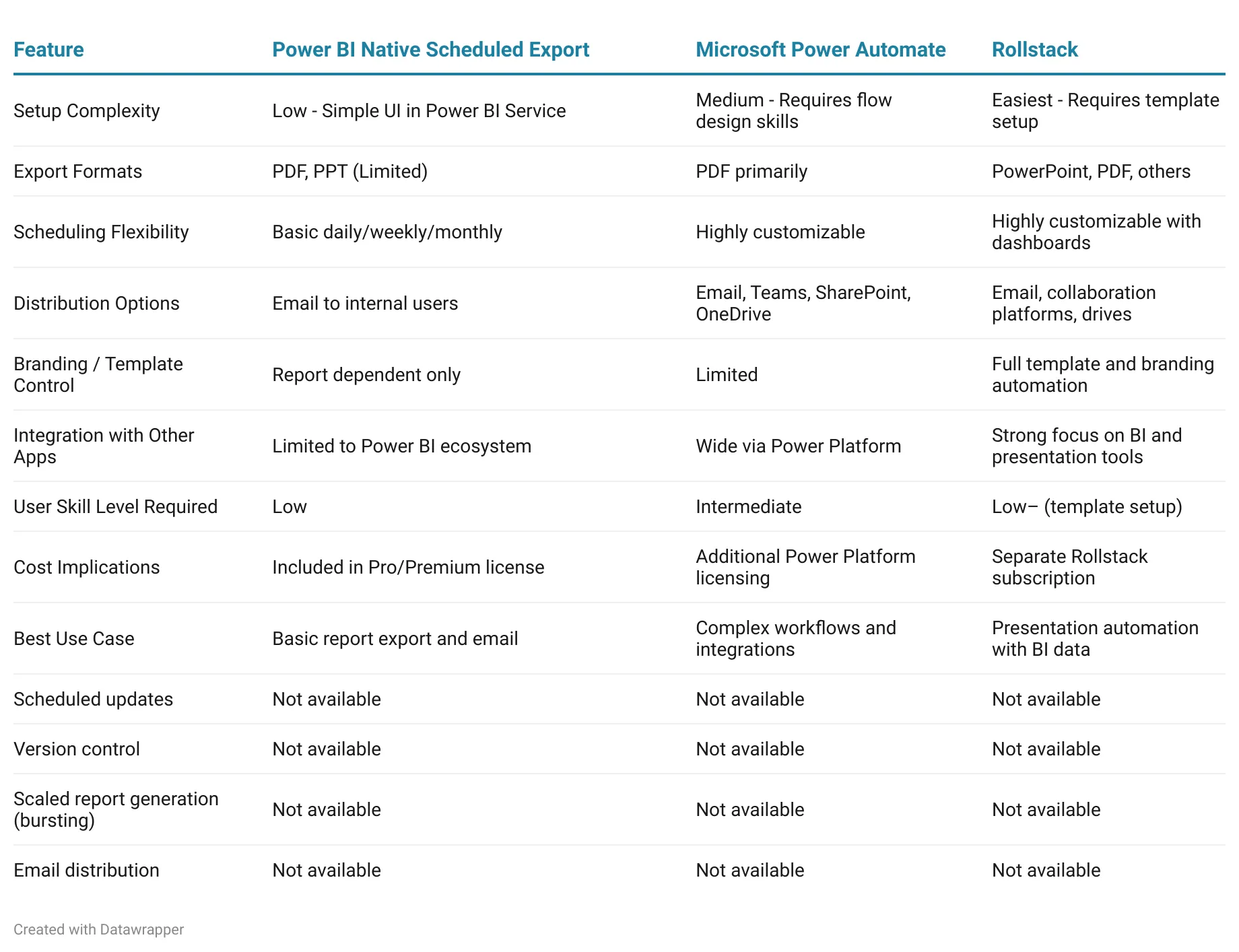
Recommendation
For teams seeking end-to-end automation that combines ease of use with professional results, Rollstack is the clear winner. While Power BI's native scheduled export provides a basic starting point for simple report distribution, and Power Automate offers technical flexibility for workflow enthusiasts, Rollstack delivers the complete package: effortless setup, branded presentation automation, and comprehensive distribution all without requiring advanced technical skills.
Rollstack excels where the other options fall short. It transforms raw Power BI data into presentation-ready slide decks automatically, eliminating the manual formatting work that native exports and Power Automate still require. The platform's intuitive template system means your team spends minutes on setup rather than hours on repetitive tasks, while ensuring every export maintains your brand standards and tells a cohesive data story.
For sales teams preparing client presentations, customer success managers delivering quarterly business reviews, or executives requiring polished dashboards, Rollstack provides unmatched value. It's the only solution that handles the entire workflow—from data refresh to template population to multi-channel distribution—in a single, user-friendly platform. The time savings alone justify the investment, while the consistently professional output elevates how your organization communicates insights to stakeholders.
FAQ
Q: What is Rollstack and how does it work with Power BI?
A: Rollstack is a presentation automation platform that connects directly to Power BI datasets and reports. It pulls live data from Power BI, automatically populates slide templates with updated visuals and charts, and distributes the finished presentations on your defined schedule.
Q: What export formats does Rollstack support?
A: Rollstack supports PowerPoint and PDF exports, allowing you to generate polished slide decks with branded templates that incorporate your Power BI data dynamically.
Q: How customizable is the scheduling in Rollstack?
A: Rollstack offers highly customizable scheduling options. You can set exports to run daily, weekly, monthly, or quarterly, with dashboard controls that let you fine-tune timing to match your reporting cadence.
Q: Does Rollstack require technical expertise to use?
A: After initial template setup, Rollstack requires minimal technical skill. The platform handles the automation, so once your PowerPoint templates are designed and connected to Power BI sources, exports run without manual intervention.
Q: Can Rollstack distribute reports to collaboration platforms beyond email?
A: Yes, Rollstack sends generated presentations via email and can upload them to shared drives and collaboration tools, making distribution flexible for different team workflows.
Q: Does Rollstack integrate with BI tools other than Power BI?
A: Yes, Rollstack integrates with multiple BI data sources including Tableau and Looker, making it a versatile option for organizations using different analytics platforms.
Q: How does Rollstack maintain brand consistency?
A: Rollstack uses centralized template management, ensuring all exported presentations follow your brand guidelines with consistent layouts, colors, and messaging across every report.
Q: What are the best use cases for Rollstack?
A: Rollstack excels at automating customer success quarterly business reviews, sales deck updates, client reporting, and any scenario where teams need regularly updated presentations with live Power BI data and professional formatting.
Q: Is there an additional cost for using Rollstack?
A: Yes, Rollstack requires a separate subscription beyond your Power BI licensing. However, the time savings and presentation quality improvements often justify the investment for teams with frequent reporting needs.
Q: How secure is Rollstack for automated report distribution?
A: Rollstack uses encryption and complies with enterprise security standards, including role-based access controls to protect your data throughout the automation and distribution process.
Conclusion
Power BI scheduled export transforms repetitive manual reporting into streamlined, automated workflows, empowering teams with timely and reliable insights. While Power BI's native feature handles basic export needs and Power Automate extends capabilities into complex workflows, Rollstack stands out as the superior solution for organizations serious about reporting excellence.
Rollstack goes beyond simple file exports by delivering fully automated, branded presentation decks populated with live Power BI data. Teams save hours of manual work each week while ensuring every stakeholder receives polished, consistent reports that tell a compelling data story. The platform's intuitive template system, flexible scheduling, and multi-channel distribution capabilities make it the most comprehensive option for sales teams, customer success managers, leadership reporting, and any scenario where presentation quality matters.
Whether you're preparing quarterly business reviews, client updates, or executive dashboards, Rollstack eliminates the tedious work of copying charts, updating slides, and distributing files manually. The result is faster turnaround, fewer errors, and presentations that consistently reflect your brand standards.
For optimizing your analytics team’s workflow, check Automated Reporting for Data & Analytics Teams


Ready to close the gap between your BI tool and the board deck?
See how finance teams automate the full delivery layer: from governed BI data to formatted, distributed board materials, without manual exports.


